
| 일 | 월 | 화 | 수 | 목 | 금 | 토 |
|---|---|---|---|---|---|---|
| 1 | 2 | 3 | ||||
| 4 | 5 | 6 | 7 | 8 | 9 | 10 |
| 11 | 12 | 13 | 14 | 15 | 16 | 17 |
| 18 | 19 | 20 | 21 | 22 | 23 | 24 |
| 25 | 26 | 27 | 28 | 29 | 30 | 31 |
- 반디집
- 이녁 하늘
- 지역화
- 파일관리자
- Directory Opus
- 국민연금
- 레시피
- 파일 탐색기
- 범용 태그 편집기
- 한글화
- 운동
- Alchemy CATALYST 2023
- 한글패치
- 이녁하늘
- 백신
- 오블완
- 파솔로 2022
- Alchemy CATALYST 2021
- v3
- 디스크샷
- 티스토리챌린지
- 한글 패치
- ANDAR
- 여행
- Soluling
- 건강
- 한글2024
- 안다르
- 탐색기
- n번방 자료실
- Today
- Total
이녁 하늘 아래
Alchemy CATALYST 2025 16.0.134 Release Notes 본문
Alchemy CATALYST 2025 16.0.134 Release Notes
2025년도 12월도 이제 중반을 지나갔다. 많은 일들이 나의 인생길에서 지나갔고 2025년 계획했던 일들과 여기까지 온것 만으로도 어쩌면 행복했는지 모른다. 예견해지 못했던 일들이 있었으며, 우리의 기억속에 남아 이젠 인생의 추억이 되는지도 모르겠다.
사용하는 로컬라이징 도구 프로그램도 많은 변천사의 기록을 남기고, 이전 버전들은 아마도 기억속에 사라지고 2025년의 마지막 버전만이 사용하는 PC에 남을 것 같다.

Alchemy CATALYST 2025 Release Notes
CATALYST 2025 Build 160134 (2025.12.15)
Enhancements:
•.NET Alignment - Added alignment of satellite assembly to satellite assembly. Previously, only main assemblies could be aligned with satellites.
Bug Fixes:
•.NET Forms (LinkLabel Property on Hyperlink)
◦The LinkLabel property on hyperlinks in .NET forms was set to invalid location values when extracting modified resources prior to reopening the TTK - resolved.
◦Hyperlink tags only appeared in string list after a segment edit - resolved.
◦After leveraging from segment without tags, hyperlink tags were missing after reopening the TTK - resolved.
◦Tags in a Link labels were missing when a file was inserted and only appeared in the Target segment when TTK reopened - resolved.
◦Link Labels tags were incorrectly positioned in source and sometimes present in Target only - resolved.
◦Form alignment with Link Labels sometimes caused tags to appear in the middle of the translated text - resolved.
•GlobalLink AI Machine Translation
◦Category selection is prioritised over language matches when only the base language found.
◦Engine specific available languages are shown; users only select the engine, as the languages are based on the source/target languages of the TTK file.
◦Navigating between TTK files with a GlobalLink AI connection previously resulted in an error dialog - resolved.
◦Chinese Languages - Users can now utilise the Chinese (Traditional, Hong Kong S.A.R.), zh-hk language.
•Dialog and UI Issues
◦Flip Dialogs - At the Dialog/Form level, flipping dialogs from the Object Ribbon would only flip the first dialog - resolved.
◦Validate Expert and Import/Export ezParse dialogs - Upgrade to the latest Codejock library caused checkboxes to be un-selectable for individual tests/parse rules - resolved.
◦String List - The right click menu operation Reset Current String List Columns did not repopulate the string list - resolved.
◦MT Connection - When copying a new API key, the old key was previously appended to instead of replaced - resolved.
◦Google Paid MT Service Setup dialog - The More information... URL updated (previous link was out of date).
Soluling setup file 1.0.1085 released on 14/12/2025.

Soluling Version History
| Soluling 1.0.1085 download(14/12/2025) |
|

Soluling 1.0.1086 이 프로그램은 정말 짜증날 정도로 아주 빈번한 업그레드는 정말 ..., 업그레이드된 프로그램을 정상적으로 사용하기도 전에 업그레이드 주기가 짧아 한글화를 입히는 것도 매우 귀찮을 정도이죠.
업그레이드 되면 더 좋아지고 더 안정적이어야 하는데 같은 항목이 두번씩 반복되어 나타나는 현상이 있죠. 이전 버전에는 없는 것들인데....
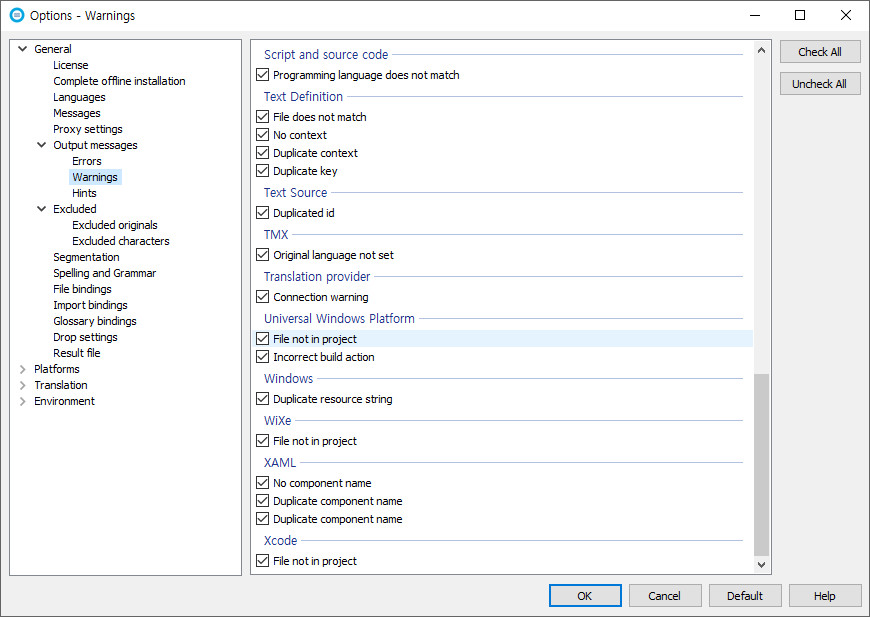

아래 내용은 새롭게 출시된 업데이트 내용입니다.
| Soluling 1.0.1086 download (17/12/2025) |
|
관련 자료실 :
1. [로컬라이징 도구] 지역화 프로젝트 작업 파일 저장소(개인 자료실)
'소프트웨어' 카테고리의 다른 글
| Notepad4 v25.11 (2) | 2026.01.10 |
|---|---|
| WizTree 4.28 (3) | 2026.01.10 |
| 그래픽 / Zoner Photo Studio X Pro 19 (0) | 2025.12.13 |
| 문서 보기 / Adobe Acrobat Pro DC 2025.001.20937 (1) | 2025.11.24 |
| “Affinity가 공짜라고?” Canva의 파격 선언 (0) | 2025.11.07 |

