
| 일 | 월 | 화 | 수 | 목 | 금 | 토 |
|---|---|---|---|---|---|---|
| 1 | 2 | 3 | 4 | 5 | 6 | |
| 7 | 8 | 9 | 10 | 11 | 12 | 13 |
| 14 | 15 | 16 | 17 | 18 | 19 | 20 |
| 21 | 22 | 23 | 24 | 25 | 26 | 27 |
| 28 | 29 | 30 | 31 |
- 이녁 하늘
- Alchemy CATALYST 2023
- n번방 자료실
- 범용 태그 편집기
- 한글2024
- 여행
- 한글 패치
- 파일관리자
- 반디집
- ANDAR
- 티스토리챌린지
- 디스크샷
- 건강
- v3
- 한글화
- 운동
- 파솔로 2022
- 한글패치
- 백신
- 국민연금
- Alchemy CATALYST 2021
- Soluling
- 이녁하늘
- 오블완
- 지역화
- 레시피
- 탐색기
- Directory Opus
- 안다르
- 파일 탐색기
- Today
- Total
이녁 하늘 아래
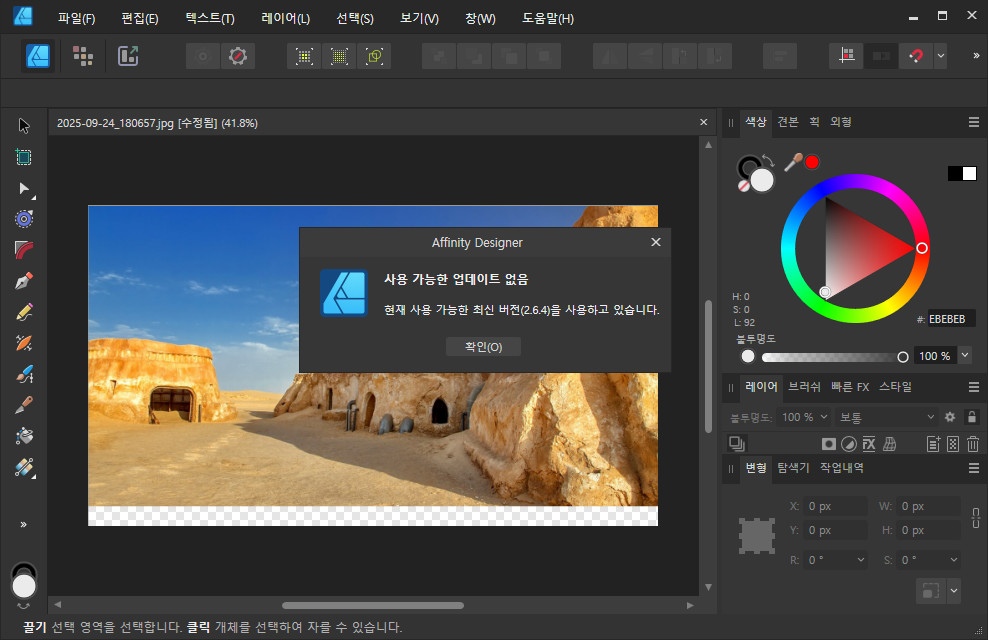
Serif Affinity v2.6.4 업데이트 소식 및 언어 패치 본문
Serif Affinity v2.6.4 업데이트 소식 및 비공식 언어 패치
This post covers most of the bug fixes that are included in 2.6.4. The fixes are organised by operating system.
(A) Bug fixes which affected all platforms
- Lens correction for OM 12-100mm F4 not being automatically applied. AF-7224
- APO-LANTHAR 35mm F2 Aspherical II lens not identified. AF-6408
- Canon RF 70-200mm F4L IS USM lens Detected as a Canon RF 70-200mm F2.8L IS USM.
- Exporting Tagged PDFs places hyperlinks at the end in the reading order (partial fix) AF-7698
- Crash when sliding through History after adding extra pages.
- Hyperlink to an External PDF File Fails if the PDF File Has Spaces in Its Filename
- Help and localization fixes
이 게시물은 2.6.4에 포함된 대부분의 버그 수정 사항을 다룹니다. 수정 사항은 운영 체제별로 정리되어 있습니다.
(A) 모든 플랫폼에 영향을 미친 버그 수정 사항
OM 12-100mm F4 렌즈 보정이 자동으로 적용되지 않음.
APO-LANTHAR 35mm F2 비구면 II 렌즈 인식 실패.
Canon RF 70-200mm F4L IS USM 렌즈가 Canon RF 70-200mm F2.8L IS USM으로 감지됨.
태그된 PDF 내보내기 시 읽기 순서대로 하이퍼링크가 끝에 배치됨 (부분 수정)
추가 페이지 추가 후 기록을 슬라이드할 때 충돌 발생.
PDF 파일 이름에 공백이 포함된 경우 외부 PDF 파일로의 하이퍼링크 실패
도움말 및 로컬라이제이션 수정 사항
(B) Bug fixes which affected Desktop (Windows and macOS)
- User file crashing when disabling Facing Pages AF-6808
- Linked Resources- Layer visibility states are not synced when file is re-opened AF-6647
- Master page pasteboard content no longer appears on page AF-6420
- Shortcut label missing in Text Style Editor. AF-7201
- User file crashing when disabling Facing Pages AF-6808
- Odd Page PSD and Affinity Files are Misplaced When Exporting to PDF as All Pages AF-6599
- IDML imports with .JPG files shown as 'Type' TIFF in the resource manager AF-1357
- Pad pages fails if Book exported as single pages instead of spreads AF-7855
- Resetting an imported Table Format results in 2 Table formats name Default, none of which can be deleted AF-7953
- Changing a Rich Black Stroke to No Line Style in the Stroke Panel Fails a Preflight Ink Density Check AF-6690
- Excel Files Using '+' and '-' Custom Formatting for Positive and Negative Numbers are Interpreted Incorrectly by Publisher's Data Merge AF-7927
- Crash when double clicking Reading order panel
- Embedded AI files lose their data once edited
- User File- Pinned objects trigger PDF export failure with 'Tagged PDF' enabled
- Independent Baseline Grid is Not Scaled Correctly
- Cannot place a website image as Linked (Remote) if the image url source contains height and width information
- After adding a single page converting facing to non facing loses content frames
- Adding a single page in a facing page document shows frames in the pasteboard that should be hidden
- Images that are promoted and replaced on a page don't show in resource manager
- Crash placing a specific AI file into an embedded document
- Artboard Margin Colour Can't be Changed
- PDF opens with incorrect sized pages followed by crashing if Edit Document is clicked multiple times.
- Crash when unlinking and relinking master page frames
- Some fields imported from docx are prefaced with the field name
- Text style imported with an attribute override from docx
- Column breaks are lost in docx files
- Adding a single page in a facing page document shows frames in the pasteboard that should be hidden
- Creating ruler guides on a second artboard cannot have their position adjusted on the artboard
- Add Pages from File Invalidates Page Hyperlinks When Using After Last Page
- Add Pages From file breaks page hyperlinks when set to 'After Last Page'
(B) 데스크톱(Windows 및 macOS)에 영향을 미친 버그 수정 사항
대칭 페이지 비활성화 시 사용자 파일 충돌
링크된 리소스 - 파일 재열람 시 레이어 표시 상태 동기화 실패
마스터 페이지 페이스트보드 콘텐츠가 페이지에 표시되지 않음
텍스트 스타일 편집기에서 단축키 레이블 누락
대면 페이지 비활성화 시 사용자 파일 충돌
모든 페이지로 PDF 내보내기 시 홀수 페이지 PSD 및 Affinity 파일 위치 오류
IDML 가져오기 시 .JPG 파일이 리소스 관리자에서 ‘유형’ TIFF로 표시됨
책이 스프레드 대신 단일 페이지로 내보내질 경우 패드 페이지 생성 실패
가져온 테이블 형식 재설정 시 '기본값'이라는 테이블 형식 2개 생성되며 둘 다 삭제 불가
스트로크 패널에서 리치 블랙 스트로크를 ‘선 없음’ 스타일로 변경 시 프리플라이트 잉크 농도 검사 실패
양수 및 음수에 대해 ‘+’ 및 ‘-’ 사용자 지정 서식을 사용하는 Excel 파일이 Publisher의 데이터 병합에서 잘못 해석됨
읽기 순서 패널 더블 클릭 시 충돌 발생
내장된 AI 파일 편집 후 데이터 손실
사용자 파일 - ‘태그된 PDF’ 활성화 시 고정된 개체가 PDF 내보내기 실패를 유발함
독립 기준선 격자가 올바르게 스케일링되지 않음
이미지 URL 소스에 높이 및 너비 정보가 포함된 경우 웹사이트 이미지를 링크된(원격) 상태로 배치할 수 없음
단일 페이지 추가 후 대칭 페이지를 비대칭 페이지로 변환 시 콘텐츠 프레임 손실
대칭 페이지 문서에 단일 페이지 추가 시 숨겨져야 할 프레임이 페이스트보드에 표시됨
페이지에서 승격 및 교체된 이미지가 리소스 관리자에서 표시되지 않음
특정 AI 파일을 임베디드 문서에 배치 시 크래시 발생
아트보드 여백 색상 변경 불가
문서 편집을 여러 번 클릭하면 크기가 잘못된 페이지로 PDF가 열린 후 크래시 발생
마스터 페이지 프레임의 연결 해제 및 재연결 시 크래시 발생
docx에서 가져온 일부 필드 앞에 필드 이름이 붙음
docx에서 가져온 텍스트 스타일에 속성 재정의가 적용됨
docx 파일에서 열 분할이 사라짐
대면 페이지 문서에 단일 페이지 추가 시 숨겨져야 할 페이스트보드에 프레임이 표시됨
두 번째 아트보드에 생성한 눈금자 가이드의 위치를 해당 아트보드에서 조정할 수 없음
‘마지막 페이지 뒤에 추가’ 설정 시 파일에서 페이지 추가 기능이 페이지 하이퍼링크를 무효화함
‘마지막 페이지 뒤에 추가'로 설정된 '파일에서 페이지 추가’ 기능이 페이지 하이퍼링크를 손상시킴 파일에서 페이지 추가 시 ‘마지막 페이지 뒤’ 설정 시 페이지 하이퍼링크가 무효화됨
(C) Bugs fixed which specifically affected Windows
- Warped objects don't print or export to EPS as warped. AF-450
- Certain View dialogs remain selectable with no open document, causing crashes or unexpected behaviour. AF-4003
- Clicking in an Empty Layers Panel With No Document Open Crashes the App AF-6580
- Cannot reset text / paragraph style from the context toolbar AF-7920
- Print: N-UP offset field resets to zero AF-7711
- Clicking an Empty Part of the Layers Panel When Recording a Macro Crashes Photo AF-7239
- Use Line Style and Use Fill Options are Not Sticky AF-7101
- Embedded document layers opacity resets to 100% AF-6483
- Crash when failing to generate/exporting to TIFF
- Opening app, closing New Document window and clicking Layers closes app.
(C) Windows에서만 발생하는 버그 수정 사항
왜곡된 객체가 왜곡된 상태로 인쇄되거나 EPS로 내보내지지 않음.
열린 문서가 없어도 특정 보기 대화 상자가 선택 가능한 상태로 남아 충돌 또는 예기치 않은 동작 발생.
열린 문서가 없는 빈 레이어 패널을 클릭하면 애플리케이션이 충돌함.
컨텍스트 도구 모음에서 텍스트/단락 스타일 재설정 불가
인쇄: N-UP 오프셋 필드가 0으로 재설정됨
매크로 녹화 중 레이어 패널의 빈 영역 클릭 시 사진 앱 충돌
선 스타일 사용 및 채우기 사용 옵션이 유지되지 않음
삽입된 문서 레이어 불투명도가 100%로 재설정됨
TIFF 생성/내보내기 실패 시 충돌 발생
앱 실행 후 새 문서 창 닫기 → 레이어 클릭 시 앱 종료
(D) Bugs fixed which specifically affected macOS
- User File crashing when disabling facing pages. AF-7074
- Edit Hyperlink- All Hyperlinks default to first in list if the hyperlink has been inserted on a shape AF-6660
- Data Merge - Anchors names are unexpectedly appended with a number. AF-7594
- Duplicating a Page with Index Markers fails to update the Index panel. AF-6996
- Paragraph panel: Decorations Stroke Start and End causes app to hang AF-8151
- Pages panel doesn't remember thumbnail size between sessions AF-6541
- IDML imports with JPEG files showing as TIFF in Resource Manager AF-8089
- When enabled 'Prefer to keep selection after delete' can lead to crash when trying to delete pages AF-7809
- Marquee Selection After Selecting the Text Flow Button Crashes Publisher
- Document recovery prompt shows after switching focus in a panel group from Text frame
- Crashing when opening Resource Manager (User file specific).
- Crash on new document when installing EXE on parallels.
- User file- PDF Open/Placement causes immediate app crash.
- Text Styles are Synchronising Between Open Documents.
- Delete article in Reading Order panel changes order of children.
- The ML Object Selection tools no longer work in the Pixel Persona of Designer in 2.6.3
- Switching documents can render text at different size.
(E) Bugs fixed which specifically affected iPad
- Develop persona: Overlay's opacity move together. AF-6284
- No Keyboard shortcuts for paste without formatting. AF-631
- Table Panel - Cell Fill colour is not retained after closing the dialog AF-7474
- On iPad, there's no provision to assign a keyboard shortcut to some tools.
- All Affinity Apps
- QR Code Tool
- Callout Ellipse Tool
- Callout Rounded Rectangle Tool
- Affinity Designer
- Area Tool
- Affinity Photo
- Median Brush Tool
- Background Erase Brush Tool
- Blemish Removal Tool
- Blur Brush Tool
- Clone Brush Tool
- All Affinity Apps
Affinity Windows applications include the fixes in lists (A)+(B)+(C)
- (A) Bugs fixes affecting All Apps
+ - (B) Bug fixes affecting desktop Apps
+ - (C) those fixes affecting Windows
Affinity macOS applications include the fixes in lists (A)+(B)+(D)
- (A) Bugs fixes affecting All Apps
+ - (B) Bug fixes affecting desktop Apps
+ - (D) Bug fixes affecting macOS
Affinity iPad applications include the fixes in list (A)+(E)
- (A) Bugs fixes affecting All Apps
+ - (E) Bug fixes affecting iPads.
If you have reported a bug and it is not yet fixed, please do not report it again. More fixes will be made in the next beta cycle.
홈페이지 : Serif Affinity v2.6.4
첨부 파일 264 :
* 프로그램 다운로드는 홈페이지에서(누구나 가능?)..,
첨부 파일 264 비공식 한글 패치:
- 264 버전 기준
- 프로그램은 홈페이지에서 다운로드
- 사용법은 이전 게시물들을 참조
- 홈페이지에서 다운로드 할 경우 현재 타언어는 지원되나 한글은 지원되지 않음
- 국내에서 대리점을 통한 판매되는 한국어가 지원되고 있는 것 같음.
- 타용도로 이 언어 파일을 절대 사용 금지 요망
- 이전 패치 언어 파일을 사용하고 계시면 삭제하고 이 버전으로 사용 권장
- 기본 언어 파일만 제공
- 기타 부분 언어 패치 파일은 이전 파일 참조(한글 사전, 기타 메세지 언어 등)
- 비공식 한글패치 버전은 다운로드 하여 사용하는 경우에는 절대 재 배포 될수 없음.
'소프트웨어' 카테고리의 다른 글
| “Affinity가 공짜라고?” Canva의 파격 선언 (0) | 2025.11.07 |
|---|---|
| ACDSee Photo Studio Ultimate 2026 (6) | 2025.10.05 |
| PureBasic 6.20 한글 언어팩(PureBasic 6.20 Korean Language) (2) | 2025.06.06 |
| HWMonitor V1.58, 6월 5일 (1) | 2025.06.06 |
| PowerISO 9.1 정식 버전 + 한국어 (단일)포터블 (1) | 2025.05.16 |


