

| 일 | 월 | 화 | 수 | 목 | 금 | 토 |
|---|---|---|---|---|---|---|
| 1 | 2 | 3 | 4 | 5 | 6 | |
| 7 | 8 | 9 | 10 | 11 | 12 | 13 |
| 14 | 15 | 16 | 17 | 18 | 19 | 20 |
| 21 | 22 | 23 | 24 | 25 | 26 | 27 |
| 28 | 29 | 30 | 31 |
- n번방 자료실
- 티스토리챌린지
- 한글2024
- 반디집
- Alchemy CATALYST 2021
- 여행
- ANDAR
- 지역화
- 오블완
- 파일관리자
- Directory Opus
- 한글화
- 이녁하늘
- 범용 태그 편집기
- 건강
- 디스크샷
- 운동
- 백신
- 파솔로 2022
- Soluling
- 탐색기
- 안다르
- 한글 패치
- 파일 탐색기
- 레시피
- Alchemy CATALYST 2023
- v3
- 이녁 하늘
- 한글패치
- 국민연금
- Today
- Total
이녁 하늘 아래
WinNTSetup 5.4.2 - 범용 Windows 설치 도구 본문
WinNTSetup 5.4.2 - 범용 Windows 설치 도구
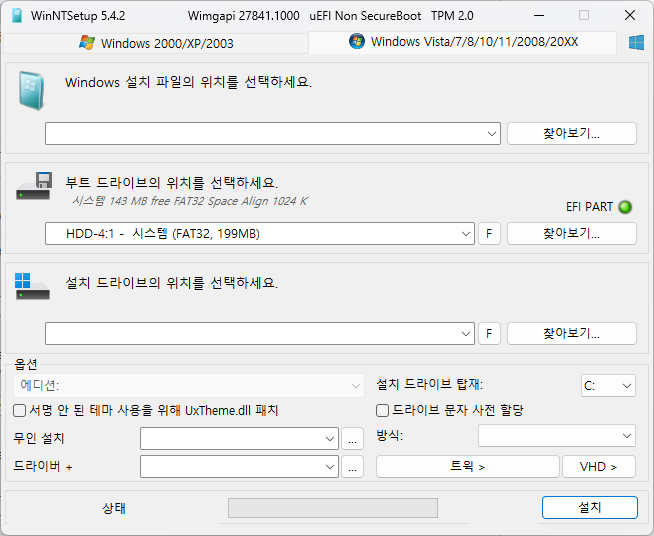
WinNTSetup - a simple but powerful universal Windows Installer
Features:
- Install (unattend) Windows 2k/XP/20??/Vista/7/8.x/10/11 x86/x64/arm64
- Practically runs even on the most minimalistic WinPE
- selectable drive letter for the new Windows installation
- Fully automated with save/load setting in ini file and various command line options
- Install Windows also if nlite/vlite has remove winnt32.exe/setup.exe
- Integrate Drivers: normal PNP and Textmode Drivers
- Patch uxtheme to allow unsigned Themes
- Some common registry tweaks and *.reg file import
- DISM APPX removal, feature enable/disable
- Simple VHD creation and Installation
- Support "Windows to Go" for Windows 7 and later installs
- Supports WimBoot and CompactOS option for Windows 7 and later
- Supports all current WIM files: WIM/SWM/ESD and ISO files
- WinCapture - capture a Windows installation to WIM or ESD file
- MinWin - simple trimming WIM in memory before apply
- WinCopy - copy an existing Windows installation to another partition
- Offline Hotfix uninstall
- Offline password reset
Not Supported:
- - No Windows embedded version (this includes WinFLP)
- - No upgrades of existing installations
About driver installation:
Every driver added in NT6.x windows will be added to the driver store.
So it's not recommended to add countless driver, but rather more really required ones.
NT5.x massstorage driver integration is possible thanks to Mr dUSHA powerful MSSTMake.exe tool
To the Unattend option:
It's possible to use an unattend.xml to run the Setup unattended.
But as the actual WinPE Setup Phase isn't effective in that way of install, all Winpe related settings inside the unattend.xml
won't be applied.
Ini config file
It's possible to save all GUI-settings to a ini file:
push Ctrl + S to save all settings to an ini.
push Ctrl + L to load all settings from an ini.
A WinNTSetup.ini file in the same dir as the app itself will be loaded automatically at startup.
It also can be selected via command line:
WinNTSetup.exe /cfg:"C:\mysettings.ini"
If you want to modify ini settings yourself, click-click has made a nice PDF for it.
For advanced users there are also hidden settings described in the included WinNTSetup.ini.txt
Command line:
- Press F1 to get list of all options
To install Windows in a VHD file:
- requires Windows 7 as OS and Windows 7 Ultimate, Enterprise or Server 2008 R2 as Source
- create a partitioned VHD and assign a drive letter (push Ctrl + Shift + V to use build in diskpart wrapper for this)
- select the VHD drive as installation drive (make sure you boot drive ist a active primary partition on a physical disk)
If you get an Antivirus warning from your AV software, please report it to them as a false positive and let them check it.
Current Version: 5.4.2
관련 게시글 :
'필수 프로그램들' 카테고리의 다른 글
| MiniTool Partition Wizard 13.5 (0) | 2025.12.27 |
|---|---|
| 파일 검색 / Everything 1.4.1.1030 정식 버전 (2) | 2025.12.07 |
| 화면 캡쳐 / FastStone Capture v11.2 (0) | 2025.11.29 |
| WinM 4.5.591 Beta 설치 (0) | 2025.09.10 |
| CrystalinfoMark etc. (0) | 2025.09.05 |


